Watercolor Dinosaurs and Tropical Floral: A Practical Design Resource for Creative Projects
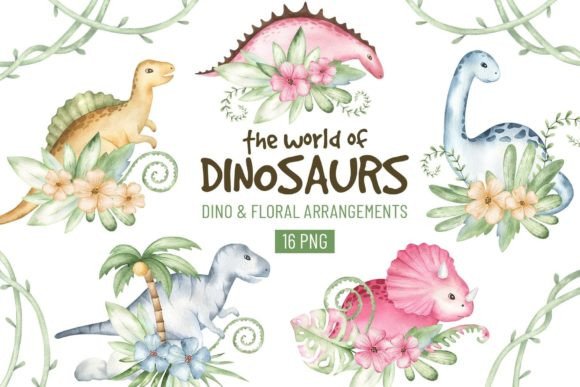
In the world of visual storytelling, few combinations capture imagination like the whimsy of dinosaurs paired with lush tropical botanicals. Hand-painted watercolor illustrations offer a soft, organic texture that digital flat designs often can’t replicate. When you merge dinosaur characters with floral elements, you create a versatile collection suited for children’s apparel, event stationery, educational content, and beyond. The “Watercolor Dinosaurs and Tropical Floral” set — which includes 16 compositions in total, with 8 dinosaur-and-floral arrangements and 8 standalone flower and greenery bouquets — acts as a ready-to-use toolkit. Each file is delivered as a high-resolution PNG on a transparent background, giving you maximum flexibility for both print and screen projects.
What Watercolor Dinosaur and Tropical Floral Illustrations Actually Contain
Understanding what you’re downloading helps you plan better. This collection isn’t a single image; it’s a curated group of assets designed to work together. The 8 dinosaur compositions feature cute, stylized dinosaurs (think a smiling triceratops wrapped in monstera leaves or a brachiosaurus surrounded by hibiscus) integrated directly with tropical greenery and blooms. The 8 floral bouquets give you standalone arrangements of leaves, ferns, and exotic flowers. Because all 16 pieces are provided as PNG files with invisible backgrounds, you can layer them without worrying about white boxes clashing with your project’s background color. They’re created at 300 dpi, which is the print industry standard, so you won’t see pixelation on physical items like invitation cards or fabric labels.
How Pre-Made Assets Fit Into a Creative Workflow
Whether you’re a small business owner preparing a product line, a blogger designing a printable, or an educator making classroom materials, pre-illustrated assets shift your focus from time-intensive drawing to composition and message. Instead of spending hours trying to paint a consistent set of dinosaurs and foliage, you can open a folder of coordinated artwork and immediately start arranging. This efficiency is valuable when you’re working under a deadline — for example, creating a last-minute baby shower invitation suite or refreshing seasonal web banners. You treat the watercolor illustrations as building blocks. Begin by selecting your primary dinosaur composition as the focal point, then pull in a greenery bouquet to balance the layout, and finally adjust color overlays or add text. The process becomes more about problem-solving and less about artistic execution.
Practical Applications Across Print and Digital Projects
These watercolor elements cross multiple project boundaries. Let’s examine real-world uses:
- Baby shower and birthday stationery: The soft, hand-painted aesthetic aligns perfectly with invitations, thank-you cards, and party decor. Because the files are 300 dpi, they will print cleanly on cardstock. Layer a dinosaur over a soft pastel background, add event details, and you have a cohesive suite.
- Kids’ clothing and merchandise decoration: For small apparel brands or DIY enthusiasts, the PNGs can be placed onto mockups or used with print-on-demand services. The transparent background ensures the design sits seamlessly on any fabric color. Keep in mind that colors may appear slightly different on fabric due to ink absorption and printer profiles — always request a sample print if possible.
- Scrapbooking and memory keeping: Digital scrapbookers can drag the illustrations into layouts without needing extraction tools. Physical scrapbookers can print and cut out the images. The variety of arrangements means you can create themed pages for zoo trips, jungle parties, or dinosaur-themed events without repeating the same visual.
- Web design and social media graphics: Content creators managing a parenting blog or a daycare’s online presence can use these PNGs for blog featured images, Instagram stories, and email headers. The transparent background avoids that “stuck-on” look, especially when placed over textured or gradient backgrounds.
- DIY décor and stationery: From wall art prints to sticker sheets and planners, the commercial-friendly nature of the art (depending on the seller’s license terms) allows broad usage. Check the specific license if you plan to sell physical or digital items containing the illustrations.
Technical Specifications and File Preparation Before You Start
Before integrating the assets into any software, handle the download and extraction process efficiently. The files arrive in a ZIP archive. If you’re on a Mac, simply double-click; on Windows, right-click and choose “Extract All.” Avoid opening or editing files directly from the ZIP folder, as this can cause permission issues or data corruption. Once extracted, store the folder in a location you can easily navigate to from your design software.
Note that all images use the RGB color space. This is ideal for screen use. For professional print, convert files to CMYK inside your design program only if your print provider specifies it. Direct conversion from RGB to CMYK can shift the soft watercolor hues, so soft-proofing in your application (like Adobe Photoshop’s View → Proof Setup) helps you anticipate changes. Test a small print section, particularly with the greenery and pastel dino tones, before committing to a large run of invitations or cards. Monitor and printer calibration play a big role; what you see on screen can differ substantially from the final output, especially with delicate watercolor gradients.
Organizing Your Digital Asset Library for Consistent Branding
If you frequently use watercolor illustrations for multiple client projects or your own product line, organization prevents rework. Create a master folder for “Watercolor Dinosaur and Tropical Floral” and separate the dinosaur compositions from the floral bouquets using subfolders. Name files clearly — for example, “dino_triceratops_monstera.png” rather than “img_001.png.” This practice makes search faster when you’re assembling a design. Consider adding a text file with licensing notes and color palette hex codes sampled from the artwork. When you reuse elements across projects, consistent file naming and storage ensure you don’t accidentally grab a low-quality copy or mix up artwork that isn’t yours to commercialize.
For branding cohesion, decide early on a few core combinations to use repeatedly. Perhaps you always pair the smiling stegosaurus with the hibiscus bouquet for your children’s clothing line. By establishing these set pairings, you build recognition. You can still vary layouts seasonally without losing the brand’s visual thread.
Quality Control and Customization Tips
Because the illustrations are hand-painted, they possess natural color variations and textured edges — that’s a strength, not a flaw. However, when scaling them, keep an eye on the edges. PNG’s transparent background may have a faint halo if you apply heavy compression or use them on certain contrasting backgrounds. In Photoshop, you can use the “Matting” options to remove any unintended fringe. For web design, export your final composition at 72 dpi with appropriate dimensions, but always work from the 300 dpi original to preserve quality.
Customization extends the usefulness of each asset. You can selectively recolor flowers in a bouquet to match a party theme, or adjust the dinosaur’s hue to create a more gender-neutral or specific color scheme. Because they are pixel-based images (not vectors), extreme enlargement beyond the print dimensions limits will reveal grain. Know the original pixel dimensions and plan your canvas sizes accordingly. For example, a 300 dpi dinosaur that’s 2000px wide can comfortably print up to about 6.6 inches wide — sufficient for invitations, stickers, and fabric patches.
Long-Term Use and Versatility of Transparent PNGs
One of the biggest advantages of a well-designed PNG illustration set is its independence from any single project file format. You can embed it in a Microsoft Word document for a school worksheet just as easily as you can place it in Adobe Illustrator for a professional print layout. Even if you switch design tools — from Photoshop to Affinity Designer, or from Canva to Figma — the assets move with you. Canva users, for example, can upload the PNGs directly and drag them onto designs, taking advantage of Canva’s background remover is unnecessary because the transparency is built in.
Over time, you might find that the dinosaur compositions lend themselves to unexpected uses: vinyl decals for a nursery wall, pattern repeats for wrapping paper, or customized tote bags for a museum gift shop. Because the files aren’t tied to a specific template, they remain adaptable. The key is to store backups. A corrupted hard drive without a backup means repurchasing or losing the set. Cloud storage or an external drive with automatic sync ensures that your investment in digital assets remains safe for years.
Integrating With Other Tools, Resources, and Decision Points
The watercolor assets don’t work in isolation. They often interact with font choices, paper textures, and complementary design elements. When building an invitation, for instance, you might pair these illustrations with a hand-lettered script font to maintain the organic feel. If your project requires consistency across a larger suite (save-the-dates, menu cards, thank-you tags), using the same dinosaur and floral motif throughout creates a unified experience. Plan your asset usage early in the project timeline. Sketch a rough layout on paper or in a wireframing tool to identify where each illustration fits and how many you need. This pre-planning prevents mid-project scrambling and reduces the chance of overusing one composition while neglecting others.
In collaborative settings, share the asset files through a shared drive with clear naming conventions. Brief team members on the licensing terms (e.g., number of end products allowed, whether attribution is required) so no one mistakenly uses the artwork in a restricted way. If you’re outsourcing printing, send the printer a test composite that includes the watercolor elements to confirm color handling. Some online print services offer free PDF proofs; take advantage of that step to check how the transparent edges and soft watercolors render on their machines.
Making the Most of Your Digital Purchase
Every digital download containing Watercolor Dinosaurs and Tropical Floral brings a balance of convenience and creative possibility. The 16 distinct arrangements in this set eliminate guesswork: you have enough variety to cover an entire project without the pieces looking disjointed. The hand-painted quality adds warmth that stock vector graphics often lack, which is crucial when targeting audiences who value artisan aesthetics — parents planning a birthday, a boutique owner selling nursery wall art, or a teacher crafting engaging learning materials.
To incorporate these materials effectively, treat them as part of a larger ecosystem. Combine them with relevant mockup templates to preview products, use layer masks for non-destructive edits, and calibrate your workflow to handle RGB-to-print conversions carefully. Regularly revisit the asset folder even after initial projects wrap up; the dinosaurs and tropical greenery might solve a visual problem you hadn’t anticipated, such as a promotional graphic for a summer camp or a YouTube channel banner for children’s content. The longevity of a transparent-background, high-resolution illustration set lies in its ability to adapt to changing creative demands without losing integrity or requiring repurchase.