Vector Floral Set: Integrating 45 Linear Floral Illustrations into Your Professional Workflow
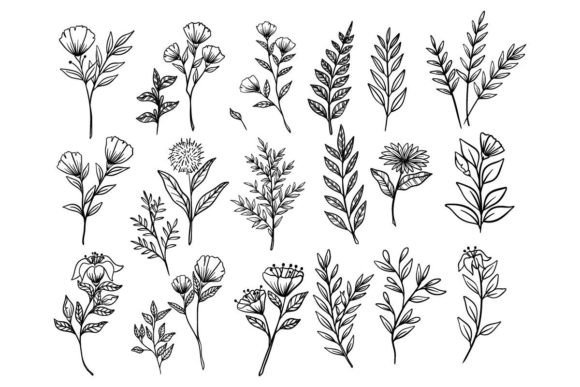
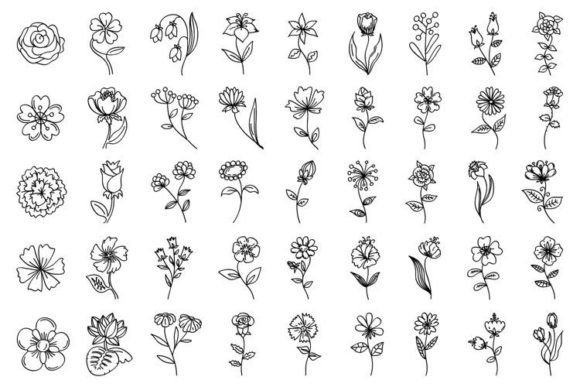
Every designer eventually runs into the same bottleneck: the need for botanical elements that don't clash with a clean, modern aesthetic. A Vector Floral Set built around black outline flowers and simple line art offers exactly that—45 stylized floral illustrations, all isolated on white backgrounds, ready to drop into branding projects, editorial layouts, packaging prototypes, and surface pattern concepts. This particular collection includes roses, lilies, herbal sprigs, botanical mac illustrations, and other line-art floral forms, delivered as high-resolution JPEG files alongside EPS and AI vector formats. Having all three file types in one download changes how quickly you can move from concept to execution.
What makes a linear floral collection worth integrating into a serious workflow isn't just the art itself—it's the structural decisions behind the files. The included JPEG sits at 11600 by 8300 pixels with a 300 ppi density, which means you can place these illustrations into large-format print projects without upscaling or interpolation headaches. Meanwhile, the EPS and AI vector files give you infinite scalability for anything from a business card icon to a trade show banner. Understanding when to reach for each format, and how to organize the set for fast retrieval, is what separates sporadic use from a genuine productivity asset.
What the Vector Floral Set Actually Contains
Before embedding any asset into a project pipeline, it's worth breaking down exactly what you're working with. This Vector Floral Set isn't a scattered collection of miscellaneous doodles. Each of the 45 illustrations is a deliberate, stylized composition: black outline flowers rendered in a consistent line weight, with variations that include single roses, clustered herbal arrangements, lily forms, and botanical mac details. The uniformity of style across the set means you can mix and match illustrations within a single project without introducing visual tension.
The file package includes three formats that serve distinct purposes. The JPEG delivers a massive 11600 x 8300 pixel canvas at 300 ppi—essentially print-ready for all but the most demanding large-format applications. The EPS vector file opens across multiple vector-editing environments, not just Adobe's ecosystem, which matters if you collaborate with teams using CorelDRAW, Affinity Designer, or Inkscape. The AI vector file gives Illustrator users native layer access, editable paths, and the ability to recolor strokes, adjust line weights, or break apart compositions without rebuilding anything.
Where Black Outline Flowers Fit in a Modern Design Process
Line art florals occupy a specific functional niche. They don't compete with photography, they don't introduce color palette complications, and they don't force a particular mood that might clash with brand guidelines. A stylized rose rendered as a clean black outline can sit on a minimalist website header, a wedding invitation suite, a skincare label, or a coffee shop menu with equal ease. The neutrality of the monochrome line treatment means the illustrations adapt to the surrounding design language rather than demanding the design language adapt to them.
Practically speaking, these 45 illustrations can enter a workflow at multiple stages. During the early concept phase, they serve as placeholder botanical elements that look polished enough to present to clients without triggering the "we'll fix that later" reaction. During production design, they become final assets—placed, scaled, and perhaps recolored to match a brand palette. During post-production or revision cycles, having the vector originals means you can adjust stroke thickness or remove specific petals without returning to a source file you don't control.
Integration with Adobe Illustrator and Other Design Tools
The AI file format is the most straightforward entry point for Illustrator users. Opening the native file gives you access to the original construction of each floral element: grouped paths, unfilled strokes, and clean anchor points. From there, you can apply global swatches to shift the entire set from black to brand-specific color, use the Width Tool to create variable stroke profiles, or isolate individual flowers and export them as SVG assets for web use. The ability to access each petal and leaf as a discrete object rather than a flattened image fundamentally changes what's possible in terms of customization.
For teams that work across multiple applications, the EPS file acts as the universal intermediary. It imports into virtually every professional design tool without conversion issues. If you're assembling a layout in Affinity Publisher, dropping an EPS floral element into a picture frame preserves its vector properties. If a client requests the artwork for their own use in an older version of a program, the EPS format is far more forgiving than a version-specific AI file.
The high-resolution JPEG serves a different but equally practical purpose. When you're working in applications that don't handle vector files gracefully—certain presentation tools, email marketing builders, or collaborative whiteboard platforms—the 11600 x 8300 pixel raster file provides more than enough resolution for pixel-perfect placement. You can also use it as a reference or preview layer while building vector compositions, quickly placing the JPEG to test scale and positioning before committing to the editable vector version.
Organizing 45 Illustrations for Efficient Access
Forty-five individual illustrations can become unwieldy if you treat the set as a single flat folder. A more practical approach is to pre-sort elements by project relevance as soon as you download the collection. Some designers create subfolders by flower type: roses in one directory, lilies in another, herbal and botanical mac illustrations in a third. Others prefer a system organized by compositional density—single blooms versus multi-element clusters—so they can quickly find the right level of visual weight for a given layout need.
If you use Adobe Bridge, Lightroom, or a digital asset management tool, adding basic keywords on import pays off within the first week of active use. Tag illustrations by silhouette shape (round, vertical, trailing), by the amount of white space they occupy, or by the design projects where you've already used them. This becomes especially valuable when you return to the Vector Floral Set months later and need to avoid repeating the same rose illustration across too many client projects.
Practical Applications Across Design Disciplines
Brand designers can use the stylized flowers as secondary logo elements or pattern-building blocks. Because the line weight is consistent across all 45 illustrations, a pattern created from three or four different flowers reads as a cohesive whole. Apply a brand's primary color to the strokes, set the background to a brand-approved neutral, and you have a proprietary pattern without commissioning custom illustration work.
Packaging designers benefit from the botanical range. A tea blend label might call for herbal illustrations; a luxury candle box might use the lily or rose elements. The vector format allows you to scale a single flower to wrap around a cylindrical container mockup or tile it as a border treatment along the base of a box. The high-resolution JPEG provides a quick placement option during client review cycles when you need to generate multiple concept variations rapidly.
Editorial and publication designers frequently need spot illustrations that break up text-heavy layouts without pulling focus from the reading experience. Black outline flowers work well as section dividers, margin accents, or chapter-opener graphics. The 300 ppi density of the JPEG file meets the resolution requirements for print publications, while the vector originals guarantee sharp output regardless of trim size.
Surface pattern designers and textile artists can use the vector files to build repeating patterns in Illustrator’s Pattern mode, testing different floral combinations and tile configurations without redrawing anything. The stylized, line-art nature of the illustrations translates well to screen printing and embroidery applications, where clean outlines and solid readability matter more than photographic detail.
Quality Control and Consistency Across the Set
One of the less obvious advantages of working with a single, cohesive Vector Floral Set rather than assembling botanical elements from multiple sources is guaranteed visual consistency. Each of the 45 illustrations shares the same stylistic DNA: the same approach to line weight, the same level of detail, the same treatment of negative space. When you source a rose from one artist and a lily from another, subtle differences in hand, proportion, and detail density can create a disjointed feel that's hard to diagnose but easy for viewers to sense.
The isolated white background across all elements is another consistency factor that simplifies compositing. You don't need to spend time removing backgrounds or adjusting layer blending modes to get clean placement. Drag an illustration onto a layout, set it to Multiply if you want the white to disappear, or leave it as-is for a framed, sticker-like presentation. The predictability of the isolation speeds up every placement decision.
Long-Term Value and Asset Longevity
Vector assets don't age the way raster assets do. As screen resolutions increase and print technologies evolve, the EPS and AI files in this collection remain resolution-independent. A floral illustration downloaded today will print just as sharply on a 600 dpi digital press five years from now as it does on a 300 dpi device today. The JPEG file's generous pixel dimensions—11600 by 8300—provide a similar longevity buffer for raster-specific applications, exceeding the requirements of most current output scenarios by a comfortable margin.
From a licensing and workflow perspective, having a complete set of 45 illustrations that you can use across multiple projects reduces the administrative friction of tracking per-asset usage rights. When you're moving quickly between client work, personal projects, and speculative pitches, knowing the entire collection is cleared for your design projects eliminates a recurring decision point that would otherwise slow down asset selection.
Making the Collection Part of a Repeatable Process
The designers who extract the most value from a resource like this are the ones who build it into a template or a starter file rather than treating it as a one-time rescue asset. Create an Illustrator template that imports all 45 vector flowers onto a single artboard or a series of artboards, organized and labeled. Save it in your project templates folder. When a new branding or packaging project starts, open the template alongside your working file, browse the available florals, and copy-paste the ones that fit the brief. This transforms the Vector Floral Set from a passive download into an active, always-available component of your design toolkit.
For teams, centralizing the set on a shared server or a cloud library like Creative Cloud Libraries means every team member draws from the same floral vocabulary. Consistent asset sourcing across multiple designers working on related projects—a brand identity rollout that spans packaging, social media, and print collateral—keeps the visual language unified without requiring constant communication about which flower appeared where.
Ultimately, a well-organized set of 45 linear floral illustrations isn't just a collection of pretty drawings. It's a productivity lever that reduces sourcing time, eliminates style-matching guesswork, and provides the technical flexibility to move across print, web, and product applications without format friction. The inclusion of both vector originals and a production-ready JPEG means you never have to pause and convert—you can stay in the flow of the work and reach for the format that matches the immediate task.