Floral Round Wreath: Beautiful Digital Designs for Crafters
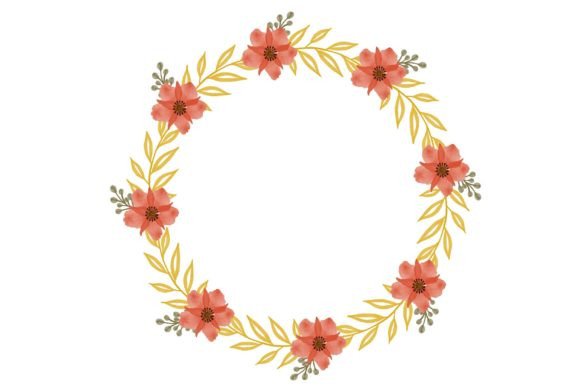
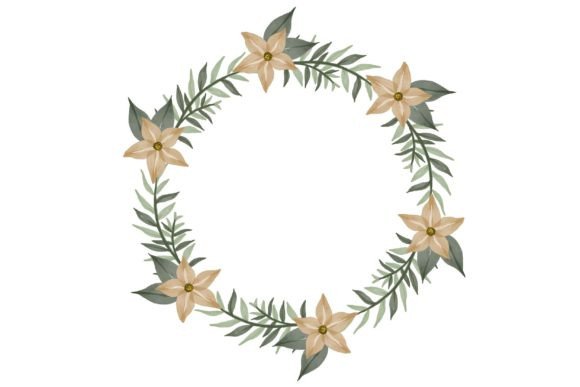
There is something undeniably charming about a floral round wreath. Whether it graces a front door, a wedding invitation, or a cozy living room wall, the circular arrangement of blossoms and greenery brings a sense of warmth and celebration. Now, imagine having that timeless motif at your fingertips in versatile digital formats, ready to be transformed into countless handmade projects. That’s exactly the experience this collection offers — you will receive digital files in 1 zip folder, packed with everything you need to start crafting right away.
The beauty of a floral round wreath lies in its endless versatility. It can be soft and romantic with watercolor blooms, clean and modern with line art, or lush and botanical with detailed leaves. Because the artwork arrives as a digital download, you aren't limited to a single final product. You can resize it, recolor it, layer it, and apply it to materials ranging from cardstock to wood to fabric — giving your creativity the driver’s seat.
What’s Inside Your Digital Download
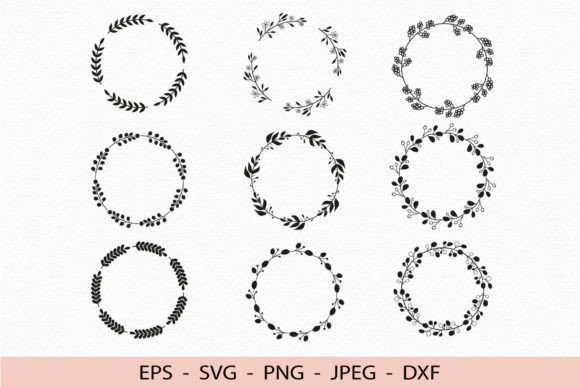
In that one convenient zip folder, you’ll discover a full toolkit designed to work with a wide range of software and hardware. The collection includes 9 distinct floral wreath designs, each provided in multiple file types so you can choose what fits your project best. Here is exactly what you get:
- 9 SVG files – Fully scalable and ready for Cricut Explore, Silhouette Designer Edition, Adobe Suite, Inkscape, CorelDRAW, and more.
- 1 EPS file – A universal vector format that opens effortlessly in Adobe Illustrator, Inkscape, CorelDRAW, and other professional design tools.
- 9 PNG files – High-resolution 300 dpi images with a transparent background. Perfect for layering, digital scrapbooking, or printing right onto colored paper.
- 9 JPEG files – Also 300 dpi and high resolution, these flat images are ideal for quick prints, social media graphics, and projects where transparency isn’t needed.
- 9 DXF files – A format often used by CNC machines, advanced plotters, and some cutting software, expanding your ability to work with thicker materials like wood or acrylic.
Having this many file options means you rarely have to convert anything. If you’re a Cricut user, the SVGs load directly into Design Space with layers intact. If you’re printing at a local shop, the 300 dpi JPEGs guarantee crisp, photo-quality output. And for those who love to combine digital and physical crafts, the transparent PNGs can be dropped onto mockups, invitations, or art prints with zero fuss.
How Creators Put the Floral Round Wreath to Work
The appeal of a floral round wreath reaches far beyond simple decoration. Because the files are so adaptable, people use them for projects that are deeply personal, professionally polished, or just plain fun. A few realistic examples show the range:
Think of a custom greeting card. You cut the wreath outline in pearlescent cardstock using the SVG on your Silhouette, then print the matching JPEG onto watercolor paper and glue them together. Suddenly you have a dimensional, botanical card that looks far more expensive than its material cost. The transparent PNG version of the same design can be layered over a favorite photo to create a heartfelt birthday memory.
Another surprising use comes from home décor. Imagine taking the DXF file and cutting the wreath shape from thin plywood with a desktop CNC. A little sanding and a coat of paint later, and you’ve made a beautiful wall hanging. Because the design is so clean, even beginners achieve professional results. If woodworking isn’t your thing, you can simply print the 300 dpi JPEG onto canvas and frame it for instant botanical art.
Small business owners, too, find value in a floral round wreath collection. Wedding stationery designers add a wreath as a logo frame around couple names, grabbing the high‑resolution PNG to ensure text remains razor sharp. Bloggers and social media marketers use the JPEGs to create cohesive, eye‑catching post graphics in minutes. An embroidery enthusiast might even trace the SVG to digitize a wreath pattern for a handmade hoop art piece.
Why a Digital Wreath Works Better Than Physical Stencils
Traditional crafting often involves hunting for the right stamp, stencil, or die cut. Digital files flip that hassle on its head. Because you download the floral round wreath in multiple formats, you have instant access — no shipping, no wear and tear. You can use one design on Monday for a paper project, then scale it up on Wednesday for a wall decal, without ever running to the store. The files reside on your computer, ready whenever inspiration strikes.
For people who enjoy experimenting, the vector SVG and EPS formats are particularly golden. You can ungroup the elements in Inkscape or Adobe Illustrator, change the petal colors, remove leaves, or combine two wreath designs to create something truly unique. The EPS file acts as a master backup that preserves every curve and color fill, while the layered SVGs let you assign different cutting actions per color if you own a machine like a Cricut Maker.
Getting Comfortable with the Different File Types
If terms like SVG or DXF feel unfamiliar, a little clarity goes a long way. An SVG is a vector file — it uses math to draw shapes, so you can resize it to a billboard or a button without losing quality. That’s why it’s the darling of cutting machines. Cricut Design Space, Silhouette Studio (Designer Edition and above), and Adobe Illustrator all handle SVG natively. The included DXF fills a similar role but often works better with older software or industrial cutters. Meanwhile, PNG and JPEG are raster images made of pixels; the 300 dpi resolution ensures those pixels are so tiny your eye sees nothing but a smooth, crisp print.
One of the biggest perks mentioned by crafters is the transparent background of the PNG files. When you place that wreath PNG on top of a textured background, a photo, or a solid color, only the floral design shows — no white box, no awkward cropping. That makes it brilliant for digital mockups, web banners, or printed stickers where a clean edge matters.
Things to Keep in Mind Before You Start
As exciting as instant downloads are, a few practical considerations can save you time and prevent frustration. First, after purchasing, the files come compressed into one zip folder. You’ll need to unzip (extract) the contents before any program can read them. On most computers, right‑clicking the folder and selecting “Extract All” does the job in seconds.
Second, confirm that your intended software can open the format you plan to use. While the 9 SVG files are crafted for broad compatibility, some free or basic versions of cutting software limit SVG uploads. Silhouette Studio Basic Edition, for example, typically works with DXF, so you might lean on that format if you haven’t upgraded. EPS files are a vector industry standard, but opening them requires programs like Adobe Illustrator, CorelDRAW, or the free Inkscape. The good news is that the bundle includes multiple options, so you’re rarely stuck.
Resolution also deserves a quick note. The 300 dpi PNG and JPEG files are high resolution, which is perfect for prints up to roughly A4 or letter size at sharp quality. If you need to go much larger, using the SVG or EPS to scale without pixelation is the smarter path. For projects destined for a Cricut or laser, remember to adjust cut settings based on the material — a floral round wreath design with delicate leaves might need a slower speed and higher pressure to keep every tiny vein intact.
Finally, think about your end goal. If you intend to sell physical products made with these designs — say, wreath decals on mugs — always review the license that accompanies the purchase. Many digital packs are geared toward personal use, but some allow small business use with certain conditions. You’ll create with confidence when you know the boundaries.
A Design That Grows with Your Skills
One of the quiet strengths of a floral round wreath in digital form is how it welcomes crafters at every level. Beginners can print and frame a JPEG and feel instantly accomplished. Hobbyists can learn new software by opening an SVG and playing with colors. Seasoned makers can combine the DXF for a 3D wooden sign, or pull the EPS into a branding suite for a rustic logo. The same 9 wreath designs shift shape with your imagination, which makes them a lovely investment that matures alongside your abilities.
Because the art is timeless and botanically inspired, it doesn’t chase fleeting trends. A neatly composed flower wreath feels just as appropriate for a contemporary minimalist kitchen print as it does for a vintage‑inspired scrapbook page. That longevity means you’ll likely return to the files again and again, each time with a fresh purpose.
When you next sit down to create, grab the format that fits your flow. Let the transparent PNG enrich a digital design, let the SVG be cut into permanent vinyl for a personalized water bottle, or let the high‑resolution JPEG become a gift tag tied to a bouquet of real lavender. A simple floral round wreath can open up more possibilities than you’d ever expect — and now you have every file you need to explore them, beautifully organized and ready to go.