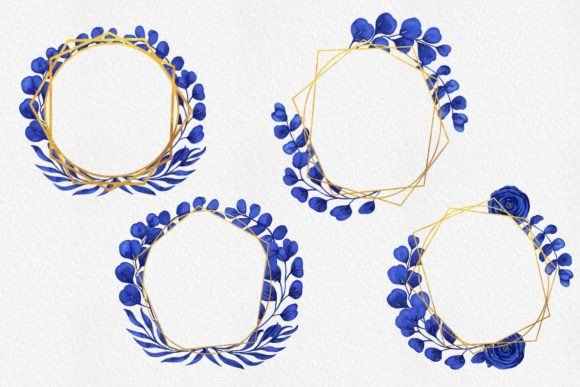
Blue and Gold Watercolor Floral Frame 1
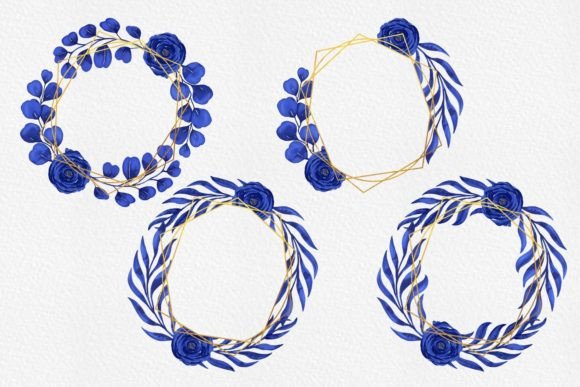
The digital world of design assets can feel overwhelming, but some collections immediately stand out for their blend of elegance and ease. Blue and Gold Watercolor Floral Frame 1 is one such resource. It gives you four pre-made wreath frame compositions, each hand-painted in watercolor and finished with deep blue petals, delicate gold accents, and a transparent background. Every file arrives as a 5000 x 5000 pixel PNG, set to 300 dpi, so they’re ready for both web use and high-resolution printing. Because the backgrounds are already removed, you can drop them straight into your project without worrying about cutouts or masking.
What Makes This Watercolor Collection Different
Unlike many generic clip art packs, this set focuses on a specific aesthetic: rich indigo and navy florals paired with luminous gold leaf or painted metallic highlights. The combination feels at once modern and classic, making it suitable for everything from wedding invitations to brand logos. The files are not scattered elements; you receive four complete wreath compositions. Each one varies slightly in layout and density, so you have options without needing to build the circular arrangement from scratch. This is part of what makes Blue and Gold watercolor Floral Wreath Frame 1 a time-saver—the heavy lifting of arranging leaves and petals is already done.
The supported software list covers the major tools: Photoshop, Canva, Corel, Adobe Illustrator, Affinity Designer, and more. That means whether you work on a full Creative Cloud suite or prefer a browser-based platform, the transparent PNGs slide right into your layers panel. There’s no proprietary format lock-in, so you can reuse the frames years from now even if your software preferences change.
Why Different Audiences Value the Same Resource Differently
One person might download these frames to create a quick social media graphic for a friend’s bridal shower. Another might build an entire product line around them. The usefulness of Blue and Gold Watercolor Floral Frame 1 isn't one-size-fits-all; it shifts depending on who you are and what you need to accomplish.
The First-Time Designer or Hobbyist
If you’re still getting comfortable with graphic tools, high-quality templates can make the difference between a frustrating afternoon and a satisfying project. A beginner in Canva can simply open a new canvas, upload the PNG, resize it, and add text inside the wreath. The transparent background eliminates knotty problems like background removal, and the 5000 px width gives plenty of room to scale down without pixelation. A hobbyist making birthday cards or party signs can print these frames at home on cardstock and get crisp results because of the 300 dpi resolution. The learning curve is minimal—what you see in the preview is exactly what appears on your canvas.
The Small Business Owner or Marketer
For someone running an online shop or handling a brand’s visual presence, time directly impacts revenue. These wreath frames can become reusable brand containers. Imagine placing a product photo inside the wreath, adding a logo below, and instantly having a cohesive social media template. The blue and gold palette works well for luxury, wellness, or boutique brands, but it also suits baby showers, spa promotions, and candle labels. Because the files are so large, you can even use them for print materials like thank-you cards, stickers, or packaging design without losing crispness. The one-time purchase eliminates recurring stock photo fees, which matters when you’re watching your business budget.
Educators, Bloggers, and Content Creators
If you publish frequently, you know how draining it can be to create fresh visuals every week. A blogger writing about event planning or home decor can use the wreath frames as a themed frame around weekly tips. A teacher crafting digital certificates or printable reward sheets can slip student names inside the circle and print them on demand. Because the wreaths have a celebratory feel, they also work well for course completion badges or webinar slides. The key here is versatility: the same asset supports a blog header on Monday and a diploma border on Friday, without looking recycled.
Professional Designers and Studios
Experienced creatives often need source material that doesn’t break when scaled or layered into complex compositions. The 5000 x 5000 pixel canvas at 300 dpi meets commercial print standards for most small-format jobs. Because the PNGs are not flattened JPGs, you can build them into multi-layered Photoshop documents, adjust blending modes, or pair them with custom gold foil effects. An illustrator might incorporate bits of the wreath into a larger portrait, while a stationery designer could combine multiple frames to create an invitation suite. These users care most about resolution, transparency, and non-destructive editing—all of which this collection provides.
Ease of Use Versus Creative Control
One of the most helpful ways to evaluate a digital asset like Blue and Gold Watercolor Floral Frame 1 is to think about where you sit on the spectrum between “drag and drop” and “full customization.” If ease is your priority, the pre-arranged compositions save you from learning watercolor painting techniques or spending hours adjusting individual flowers. You can treat each wreath like a photo frame: place it, align your text, and export. On the other hand, if you have intermediate or advanced skills, the transparent backgrounds and large resolution actually grant you creative control. You can mask out sections of the wreath, recolor the blue petals in an adjustment layer, or even isolate part of the floral arrangement to use as a corner accent. The asset doesn’t limit you—it gives you a clean, high-quality starting point.
Practical Scenarios That Showcase the Range
To see how different priorities play out, consider these examples:
- Wedding stationery: A couple wants DIY invitations that look like custom watercolor paintings. They open the wreath frame in Canva, type their names and date in an elegant font inside the circle, and order prints on cotton paper. The 300 dpi resolution means the printed result is smooth, not jagged.
- Social media template: A marketing freelancer serves five different clients. She drops the wreath onto a solid-color background, adds a client’s quote inside, and resizes the image for Instagram, Facebook, and Pinterest—all from the same 5000 px source file.
- Product packaging mockup: A candle maker orders kraft boxes and wants a professional look without hiring a designer. She inserts the wreath in Affinity Designer, places her logo in the center, and sends the design to a sticker printer. The transparency means no white box around the floral frame.
- Classroom printable: A third-grade teacher creates a “Star Student” certificate by opening the file in Photoshop, adding “Congratulations” at the top, and leaving the center blank for the child’s name. She prints a stack each month.
What to Check Before You Decide
While digital products often look beautiful in the preview, it’s wise to match the asset to your actual needs. Ask yourself what you’ll really use this for, and whether the file type, size, and licensing fit. Blue and Gold Watercolor Floral Frame 1 ships as a PNG bundle, not an editable vector. That’s important if you need infinite scalability or plan to recolor individual elements extensively. For most users—especially those working in Canva, Photoshop, or Affinity—the 5000 px size provides enormous flexibility, and the lossless format keeps edges crisp. But if your primary tool is Adobe Illustrator and you need to blow up the wreath to billboard scale, you’ll have to place the PNG as a linked image rather than an infinitely scalable vector. The good news: 5000 pixels at 300 dpi prints roughly 16.7 inches across, which covers everything from business cards to large wall art for most home decor purposes.
How Beginners and Pros Approach the Same Asset
It’s interesting to observe how different skill levels interact with the same file. A beginner in Canva might use the wreath exactly as delivered, only adjusting size and position. They’ll appreciate that the gold watercolor elements already “pop” without additional tweaking. An intermediate user in Photoshop might duplicate the layer, apply a subtle inner glow, and change the blend mode to make the gold look more metallic. An advanced designer might take parts of the wreath and integrate them into a completely different composition, such as a book cover or a magazine layout, using masking and compositing. The product does not force any single workflow; it simply provides a high-integrity base that adapts to your approach.
Long-Term Value and Reusability
Unlike a subscription-based asset library where you lose access when you cancel, a one-time download of Blue and Gold Watercolor Floral Frame 1 becomes part of your permanent toolkit. That matters for small business owners who need consistent branding assets over years, or for hobbyists who craft in seasonal bursts. The blue and gold color scheme is versatile enough to work across multiple holidays and themes—navy for winter, gold for autumn, or both together for spring elegance. Over time, you might reuse the same wreath in holiday cards, birthday banners, and professional certificates, getting far more value than from a single-use template.
Making the Final Call
If your projects frequently call for a touch of hand-painted elegance, and you work in a compatible software environment, this collection aligns well with both quick-turnaround tasks and more polished productions. Picture the kind of visuals you create most often. Are you regularly framing text, photos, or logos in a circular layout? Do you need assets that look bespoke without requiring you to paint them yourself? If the answer leans yes, then the four compositions in Blue and Gold watercolor Floral Wreath Frame 1 likely fit your workflow. The combination of generous resolution, transparent backgrounds, and a tightly curated color palette makes them a practical addition for creators who value both speed and aesthetic quality.